


Graffiti Name Logo Maker
4.8772.00 Reviews
App Specs
- Version
- 7.0.3
- Updated On
- License
- Free
- Downloads
- 1,000,000+
- Developer
- GeniusTools Labs
- Categories
- Photography
- Platform
- Android
Screenshots
 Analysis by AppCompare
I like Graffiti Name Logo Maker most when I treat it as a quick lettering playground rather than a full graphic-design studio. It gives a name or short phrase a graffiti-inspired look without asking me to learn a complicated editor, and that makes it an easy choice for a profile image, a casual post, or a small personal project. The trade-off is that its ready-made style is also its boundary: anyone who needs precise layout control or a highly original illustration will probably want a more flexible tool.
A quick route from text to a visual idea
The app’s central task is simple: enter text, experiment with a graffiti treatment, and make an image you can keep or share. That narrow focus is useful. Rather than starting with a blank canvas and a long list of design decisions, I can begin with the word that matters and see how it reads in a bold street-art style. For a short name or nickname, this is more approachable than building lettering from scratch in a general-purpose photo editor.
I would use it for low-stakes creative moments: making a playful image for a group chat, trying a new look for a gaming profile, or preparing a small graphic for a personal page. It is also handy when someone wants to test a few visual directions before committing to a design elsewhere. The result may be more of a fun personal mark than a polished brand identity, but that is exactly where a focused name maker can be satisfying.
What the editing choices are good for
Color, outlines, and shadows are not just decoration; they change how legible the lettering feels. When I am working with a bright background, a darker outline can help the text hold its shape. Against a darker scene, a stronger fill or contrasting edge can keep the name from blending into the image. I recommend changing one element at a time and checking the whole composition after each change. It is an easy way to avoid piling on effects until the letters become hard to read.
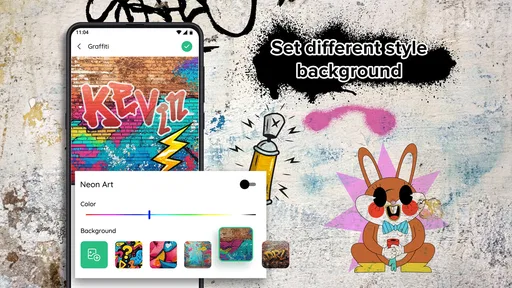
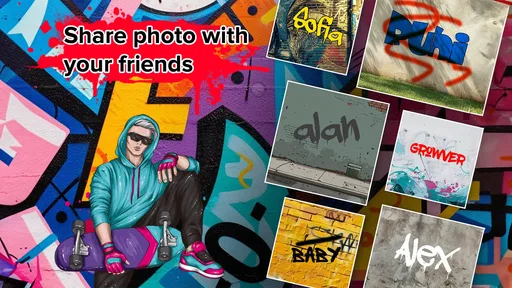
The urban backgrounds are useful when I want the finished design to feel placed in a setting rather than floating on a plain field. Brick and shutter textures can add atmosphere, but they can also compete with detailed lettering. For a longer phrase, I would favor a simpler visual treatment and inspect the result at the size it will actually be viewed. A design that looks lively full-screen may lose clarity when reduced to a small avatar.
A practical workflow is to start with a short word, choose a background, then settle the lettering color before adding extra depth with shadows or outlines. I would save a clean, readable version before making a more dramatic one. That gives me a safer option to share if the heavily styled attempt becomes too busy, and it makes comparisons easier than relying on memory while switching back and forth.
Where it fits among photo and design apps
Compared with a general photo editor, this app is more direct for graffiti-style text: the idea is to get from a name to a themed image without assembling every effect manually. A broader design app is the better choice if I need exact spacing, several layers of artwork, careful typography, or a layout that must match a specific visual identity. Those tools can do more, but they also ask for more time and decisions.
Worth Reading Before You Choose

EA SPORTS FC Mobile 26 Is a Bigger Football Game, but It Takes Time

Flipboard Shows What News Apps Must Do Beyond the Feed

Switching to Android Auto Means Rethinking Your Driving Routine

Google Calendar Makes a Crowded Week Easier to Manage

Ludo King Makes the Most of the Minutes Between Plans

Baby Panda World Brings Quick Play to Modern Phones, but Its Game Library Feels Busy
It is not a substitute for photographing real street art, either. Its appeal is the quick, stylized treatment of text, not documenting a physical mural or producing a hand-painted original. I would choose it when the goal is a playful digital graphic and choose a photo or illustration tool when realism, custom drawing, or detailed composition matters more than speed.
Who will enjoy it—and who may not
I think it suits beginners, younger creators, and anyone who wants a personal name graphic without a steep learning curve. It can also work as a starting point for someone collecting visual ideas: try different colors and backdrops, keep the versions that feel promising, and use them as references for a more carefully designed piece later. The app is rated for Everyone, so its basic creative appeal is broad.
I would steer people away if they need a professional logo with precise export control, a consistent identity across multiple formats, or lettering that looks genuinely hand-drawn. A template-based effect can feel limiting once the first novelty wears off, especially if several styles seem close to one another. It is also less suitable for a long sentence than for a name or compact phrase, since graffiti lettering needs room to remain readable.
For an everyday example, imagine a friend organizing a casual birthday chat and wanting a colorful group image. They could enter a nickname or short inside joke, choose a wall-like backdrop, and adjust the contrast until the words stand out on a phone screen. That is a good fit: quick, personal, and not dependent on professional design skills. If the same image needed to be printed prominently or used as a business mark, I would move to a tool that offers more deliberate control and review the artwork at the intended output size.
My experience using it
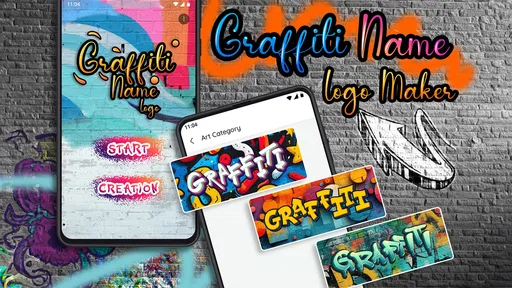
When I first opened the app, I was met with a splash of colors that immediately set the mood. The interface is pretty straightforward, which is a relief because who wants to spend ages figuring out how to navigate an app, right? It’s all about jumping in and getting those creative juices flowing.
The Creative Process
Alright, so once you’re in, the real fun begins. You start by entering the text you want to turn into a graffiti masterpiece. Whether it’s your name, a catchphrase, or maybe even your pet's name, the possibilities are endless. I went with my nickname, and seeing it transform was oddly satisfying.
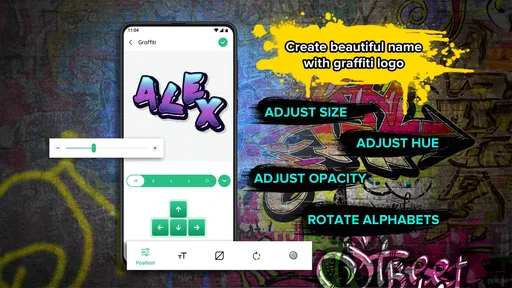
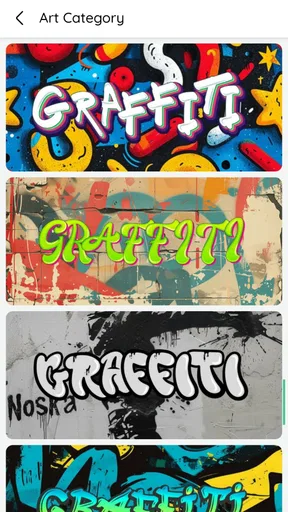
The app offers a bunch of fonts that mimic realistic graffiti styles. You can also play around with colors, shadows, and outlines. It’s like having a virtual spray can at your fingertips. I spent a good chunk of time tweaking the colors to get that perfect pop against the background.
Features Galore
One of the standout features is the background selection. You can choose from a variety of urban backdrops, like brick walls or metal shutters, which really make your graffiti stand out. This feature adds a layer of authenticity that I didn’t expect but totally appreciated.
Another cool aspect is the ability to save and share your creations. I mean, what’s the point of crafting something awesome if you can’t show it off, right? The app lets you easily share your designs on social media or save them to your device. I might have sent mine to a few friends just to brag a little.
Room for Improvement
Now, as much as I enjoyed using the app, there are a couple of things that could be improved. I noticed that while there are plenty of fonts, some of them look quite similar, so a bit more variety would be welcome. Additionally, the app could benefit from a tutorial or tips section for those who are new to this kind of design work.
On the technical side, the app ran smoothly for the most part, though there were a couple of moments where it lagged slightly when I was adding more intricate details. It wasn’t a deal-breaker, but it’s something to keep in mind.
Availability and value
GeniusTools Labs is the developer behind this free photography app. It has a 4.7 average from around 29,000 ratings, with over a million installs, so it has found a sizable audience. The current version is 7.0.2 and it runs on Android 5.0 or later. Optional in-app purchases range from $0.99 to $99.99 per item, so I would check the purchase details before choosing anything paid rather than assuming every option is included at no cost.
The app was released on March 24, 2021, and its Everyone age classification fits the casual, text-focused creative use I describe here. I would still approach it with a clear expectation: free access makes it easy to try, but it does not turn a preset-led editor into a professional lettering suite. If you only need a quick image, that distinction may not matter; if you are choosing a tool for ongoing design work, it should.
Final Thoughts
Overall, the app is a blast to use, especially if you have a passion for street art or just want to dabble in something creative. It’s user-friendly enough for beginners but also offers enough customization options to keep more experienced users engaged.
If you’re looking for a fun way to express yourself and create something visually striking, give this app a whirl. It’s a great way to kill time and come away with something you can proudly display. Just be warned, once you start, it’s hard to stop!
Pros
- Intuitive interface for easy design creation.
- Wide variety of fonts and styles available.
- Customizable color options for unique designs.
- Offline functionality for design on the go.
- No watermark on final designs.
Cons
- Limited free features; many are premium.
- Occasional ads can interrupt workflow.
- Some fonts lack special characters.
- User interface could be more modern.
- Limited export options for designs.
FAQs for Graffiti Name Logo Maker
What is Graffiti Name Logo Maker used for?
Graffiti Name Logo Maker is an app designed to help users create unique and stylized graffiti logos and names. It offers a variety of fonts, colors, and design tools that make it easy to personalize your creations. Whether you're looking to design a logo for personal use or for a project, this app provides the necessary features to enhance your creativity.
Is Graffiti Name Logo Maker free to download and use?
Graffiti Name Logo Maker is free to download, with basic features accessible at no cost. However, the app offers in-app purchases for additional design elements and premium features. These purchases can enhance your creative options, but they are optional and not necessary for basic use.
Does Graffiti Name Logo Maker require an internet connection?
While Graffiti Name Logo Maker can be used offline for basic designing, certain features, such as accessing online resources or saving designs to cloud storage, require an internet connection. To fully utilize all features, it's recommended to have a stable internet connection.
What customization options are available in Graffiti Name Logo Maker?
The app offers a wide range of customization options, including various fonts, a color palette, and design tools to adjust the size, rotation, and layering of your graffiti designs. Users can also add backgrounds, textures, and shadows to make their logos more dynamic and visually appealing.
Is Graffiti Name Logo Maker suitable for beginners?
Yes, Graffiti Name Logo Maker is user-friendly and suitable for beginners. The intuitive interface and guided tutorials make it easy for new users to start designing immediately. Advanced users can also find a variety of tools to create more complex and detailed designs.


